HAMIOS v5.0
NEW: Version 5.0 — PySide6 / Qt6 rewrite

HF Propagation &
Atmosphere Monitor

Real-time solar conditions, ionosphere, DX cluster and world map — everything in one application for the radio amateur.
Download HAMIOS 5.0 (.exe) Source code on GitHub
Windows 10/11  ·  No installation required  ·  Open source
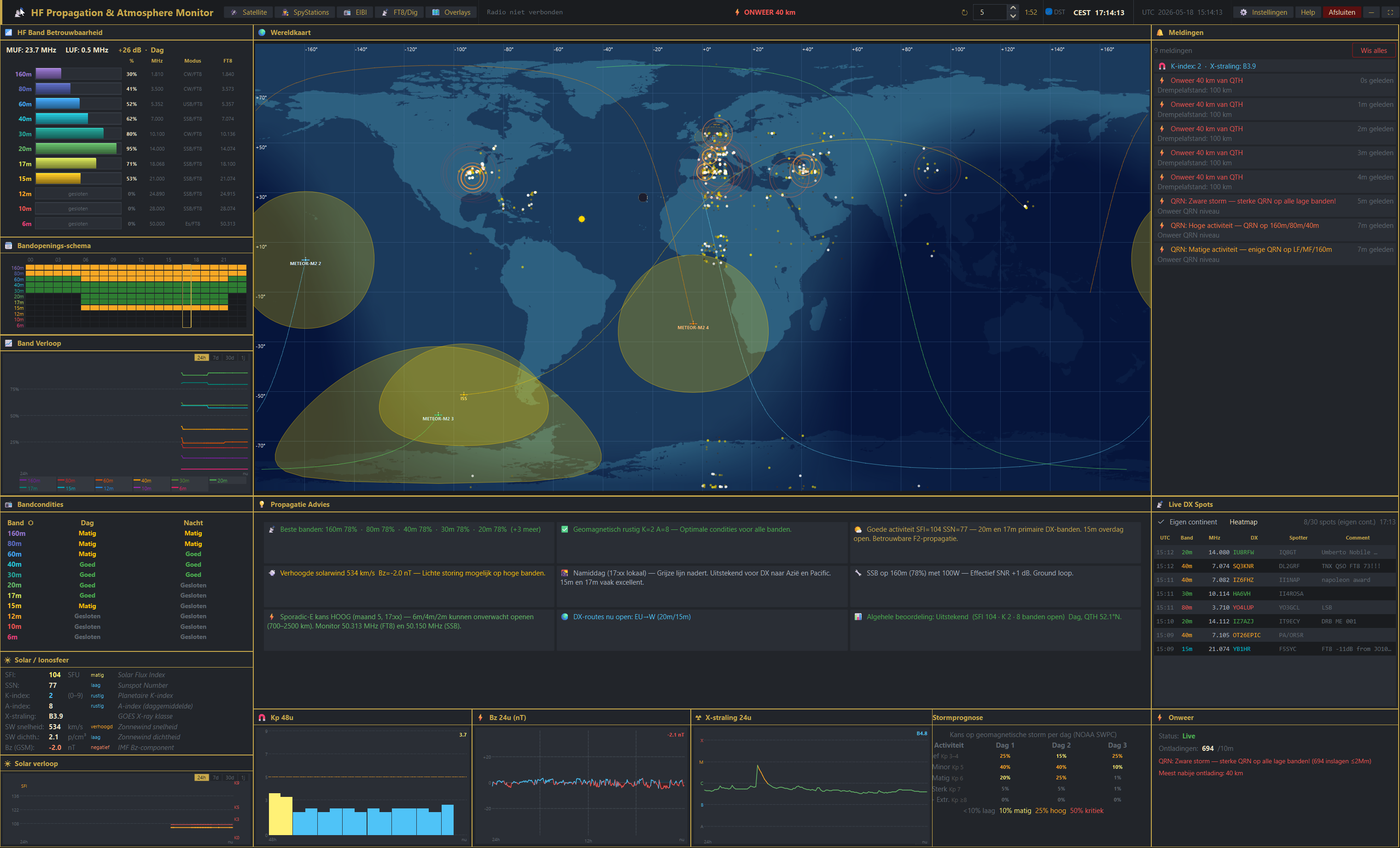
HAMIOS interface – HF Propagation & Atmosphere Monitor

What does HAMIOS do?

HAMIOS combines dozens of data sources into one dark, customisable dashboard. Whether you want to chase DX, track a solar storm or just know which band is open right now — everything is right in front of you.

One dashboard for everything

HF radio propagation depends on the state of the ionosphere — a layer of the atmosphere ionised by solar radiation. Solar flares, geomagnetic storms, and the day/night cycle all influence which frequencies travel where, and how far. To get a complete picture, an operator traditionally had to visit a dozen different websites: one for solar indices, another for Kp forecasts, a third for live DX spots, yet another for lightning conditions. HAMIOS brings all of that together in a single, always-on window.

The application pulls live data from authoritative sources — NOAA SWPC for solar and geomagnetic data, DXWatch.com for DX cluster spots, Blitzortung.org for real-time lightning positions, and CelesTrak for satellite TLE orbital elements. It processes and correlates these streams continuously, then presents everything through a set of colour-coded panels arranged around a high-resolution world map.

How it works

At the heart of HAMIOS is a band reliability engine. Using the current Solar Flux Index (SFI), Sunspot Number (SSN), Kp index, and time of day, it calculates a reliability percentage for each amateur band from 160 metres down to 6 metres — separately for day and night paths. The results are shown as colour-coded bars (red → yellow → green) so you can see at a glance which bands are worth trying.

The 4096 × 2048 world map draws the day/night terminator in real time, overlays the aurora oval derived from the current Kp index, and plots live lightning strikes as they are detected by the Blitzortung sensor network. Satellite positions and ground footprints are computed from fresh TLE data and updated every few seconds. DX cluster spots appear as labelled markers on the map, making it immediately obvious where activity is concentrated.

If your radio supports CAT control (Yaesu, Kenwood/Elecraft or Icom), HAMIOS can connect via the serial port and tune directly to a clicked DX spot — no manual frequency entry needed. An automatic alert system watches for approaching thunderstorms and deteriorating geomagnetic conditions, and posts timestamped warnings in the notifications panel the moment a threshold is crossed.

Who is HAMIOS for?

🎯
DX hunters

Live DX spots, band reliability scores and a world map with active regions pinpointed — everything needed to decide in seconds whether a rare entity is workable from your QTH.

🔬
Solar observers

90-day interactive charts for SFI, SSN, Kp and Bz, plus GOES X-ray flux graphs, let you study solar cycles and their effect on the bands over time.

📻
Everyday operators

Open HAMIOS alongside your logging software and keep a constant eye on propagation without leaving your operating position. Storms and openings are flagged automatically.

🛰️
Satellite & SWL enthusiasts

Real-time satellite footprints, the built-in EIBI shortwave schedule and the SpyStations numbers-station database make HAMIOS equally useful for SWL and satellite work.

Key features at a glance

☀️

Solar & Ionosphere

Real-time SFI, SSN, Kp index and X-ray class. Colour-coded reliability scores per band (160m–6m), day and night.

🌍

Live World Map

4096×2048 map with day/night terminator, aurora oval, satellite positions and lightning detection via Blitzortung.org WebSocket.

📡

DX Cluster

Live spots from DXWatch.com. Filter by band, mode or continent. Click a spot to tune your radio instantly via CAT control.

🛰️

Satellite Tracking

TLE data from CelesTrak. Satellite position and footprint updated in real time on the map. Includes ISS and amateur satellites.

Lightning & Thunder

Live lightning detection via Blitzortung.org. Automatic QRN alerts when a storm approaches your threshold distance.

📻

CAT Radio Control

Support for Yaesu, Kenwood/Elecraft and Icom via serial port. Click a DX spot and the radio tunes immediately.

📈

Historical Data

90 days of interactive charts covering band openings, SFI, Kp and Bz. Spot patterns and predict conditions.

🔢

EIBI & FT8

Built-in EIBI shortwave schedule browser and FT8/digital mode reference tables. SpyStations (numbers stations) database included.

🧩

Customisable Panels

11 draggable panels. Place everything exactly where you want it. Layout is saved automatically.

Version history

v5.0 18 May 2026 Latest

Complete rewrite to PySide6 / Qt6

  • Hardware-accelerated world map — no more PIL/Pillow dependency
  • Ready-to-use EXE — no Python installation required
  • New day/night terminator algorithm, more accurate aurora oval
  • Improved satellite tracking and footprint visualisation
  • Faster map rendering and smoother animations
v4.0.2 12 May 2026

Real-time lightning overlay via Blitzortung

v4.0.1 8 May 2026

Draggable panel system with 11 customisable panels

v3.4 7 May 2026

Satellite tracking & SpyStations database

v3.0 28 Apr 2026

Completely new interface with central world map

Screenshots

HAMIOS full dashboard

Full dashboard — world map, band reliability, DX spots and alerts

More screenshots and GIFs on the GitHub page.

Download

💾

HAMIOS 5.0 — EXE

Ready to use. No Python or additional installation needed. Extract to an empty folder and run.

  • Windows 10 / 11 (64-bit)
  • ~50 MB disk space
  • Internet connection for live data
Download HAMIOS5.exe
🐍

Python Source Code

For advanced users. Requires Python 3.10+ and PySide6.

  • Python 3.10 or newer
  • pip install PySide6 requests
  • Optional: pyserial, websocket-client
View on GitHub

Installation in 3 steps

  1. Download HAMIOS5.exe using the button above.
  2. Create an empty folder (e.g. C:\HAMIOS\) and place the .exe file inside.
  3. Double-click HAMIOS5.exe — configuration is created automatically on first launch.

About HAMIOS

HAMIOS (HF Atmosphere Monitor for Ionosphere Observation and Statistics) was developed by Frank van Dijke , a radio amateur from the Netherlands. The project started as a personal tool to quickly assess band conditions without having to consult dozens of websites.

The software is fully open source and actively maintained. Contributions, bug reports and suggestions are welcome via GitHub.

Developed in collaboration with Claude AI (Anthropic) as coding assistant.

Technical details

FrameworkPySide6 / Qt6
LanguagePython 3.10+
PlatformWindows 10/11
LicenceOpen source (GitHub)
DX dataDXWatch.com
LightningBlitzortung.org
Satellite TLECelesTrak
Storm dataNOAA SWPC